|
By flotsam
Aurora Hills: Chapter 2
Novasoft Interactive Ltd
Picking up where things left off in Chapter 1, Chapter 2 is more of the
same. Which is a good thing.
You get a “previously on” to get things going, which should bring you up
to speed if it’s been a while since you played. When we left off, Ethan
was following the trail of Jennifer Reid, his fellow Park Ranger. A note
said she would set up camp and wait, but while he finds the camp it has
been ransacked and Jen is nowhere in sight. Which means it is further
into the forest, and so we begin.
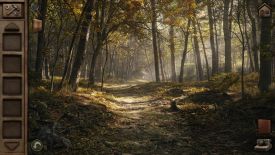
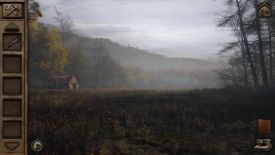
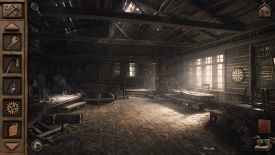
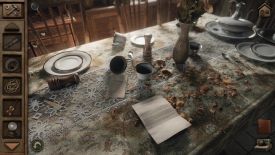
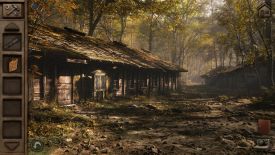
Like Chapter 1, the game is completely point and click, and uses a
series of photo-realistic static images to create the game world. You
click your way through them, exploring each with your mouse, and back
out of each image in order to retrace your steps.
There are three areas to explore, each only available after you do
everything necessary to be able to move on. Within each area there is
plenty to explore and numerous puzzles to solve, and the game has
definitely been up-sized. I reckon its about twice the size of the
earlier chapter in terms of doing stuff, puzzles included.
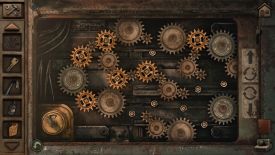
Which is a good thing, as none of the puzzles are dull, and many are
particularly good. Quite often you will find yourself having to
recognise what clue/s go with which puzzle, and how do they go together
to produce a solution. They are all logical, even if that logic escaped
me once or twice. I enjoyed them a lot. You will also find and use a
range of items, and combine a few of them as well.
There are a lot of things to unlock, codes to discern, images and
information to interpret. Fix some machines, restore some power, and
change a tyre or two. It’s a satisfying bag of puzzling.
When what to do eluded me, the magnifying glass top left could assist.
It will be there if you play on Normal, and depending on when it is
accessed will point you in the right direction, offer progressive clues
to solving puzzles, and even allow you to ‘skip’ the puzzle altogether
(i.e., have it solved for you). It might also indicate that you can’t
yet solve a particular puzzle, which means there are more clues to be
found. I liked that aspect a lot, as it encouraged further exploration
and then contemplation.
If you play on Hard you will be on your own, but you can turn the hints
on at any time in the menu. So too an objective icon might assist, and
between them both you shouldn’t be stuck for any longer than you want to
be.
As in the earlier chapter, there are no hotspots you can identify, and
the cursor doesn’t respond as you search. If something seems interesting
just click on it. You will certainly click on things that do nothing,
but the game might tell you something like “there is nothing else useful
in here,” which prevents you clicking on everything in a
box/cupboard/trunk etc. just in case. While I missed an object or three,
I didn’t miss the lack of hotspots, and thought the game did a good job
of suggesting what things might warrant my attention.
A camera icon bottom right will be a very handy item. The ability to
take photos largely avoids the need for pen and paper. If you think
something might be a clue or a significant piece of information, click
the camera icon bottom left to take a photo, which will put the image in
your album fo revisiting at any time. I took more photos than I needed,
but it certainly helped when e.g., a puzzle required collating
information from various sources and locations.
I still made notes about where unsolved puzzles might be, and even
linked those notes with a photo. The larger areas mean you might not
remember which puzzle is where, or what still needs to be solved. Or
maybe that was just me!
There is a degree of necessary backtracking but never into an earlier
area. Once you leave one area, you don’t/can’t go back; all the clues
you gathered to the puzzles are no longer relevant, and only one (to my
recollection) inventory item got carried forward. Which means its really
three self contained parts, but it felt manageable rather than limited.
Each scene is visually rich, supported by situational music and ambient
sound. Your inventory ribbon sits left of screen, and you just drag
items to try and use them in the game world. Combining items requires
you to click the tool icon at the top of the ribbon, which opens a
window into which you can drag the items you want to try and combine. A
few cutscenes punctuate events. You can’t save manually, the game saving
to a single point on exit. Just hit continue to pick up where you left
off.
It ends with a dramatic bang, and sets things up for an expanded
narrative in Chapter 3. I look forward to it.
I played on:
OS: Windows 11, 64 Bit
Processor: Intel i7-9700K 3.7GHz
RAM: Corsair Dominator Platinum RGB DDR4 32GB
Video card: AMD Radeon RX 580 8192MB
GameBoomers Review Guidelines
February 2026
design copyright© 2026
GameBoomers
Group
 GB
Reviews Index GB
Reviews Index |