|
By flotsam
Back In The Swamp
Cryo Swamp
Who doesn’t like a bit of post-apocalyptic first-person
adventuring in a swamp inhabited by giant insects? Not to mention that
you can play it completely point-and-click, and save to multiple slots
whenever you choose.
Back In The Swamp is the debut release and solo
enterprise of a game maker from Toulouse, and a fine one it is too.
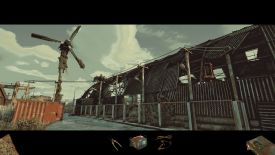
About four hours of user-friendly exploration await, through a ruined
landscape littered with the bits and pieces of a large scale conflict.
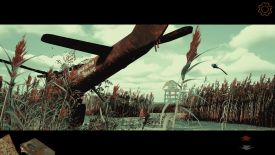
The opening helicopter scene gives a sense of what has gone on.
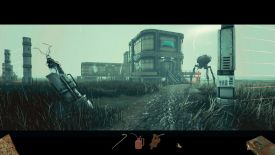
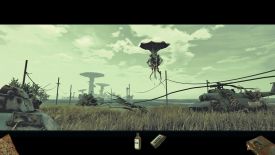
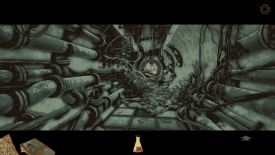
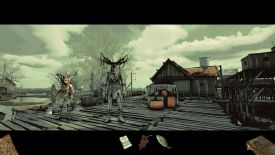
Graphically it reminded me a bit of a high-end graphic
novel, but however it might be described it does look good. It's
visually rich and the style suits the events, as do the muted hues and
tones of the environment, whether that be internal or outdoors. It can
be grim, as after the apocalypses are, so bright and sparkly is not
required. Supported by an excellent soundscape and a not overused
soundtrack, you can feel the dilapidation and degradation throughout. It
all works together really well.
There is no spoken and almost no written word either,
with any information needed being provided through little pictograms. If
for instance a character wants something in return for something else,
line drawings of the relevant items will convey what is required. It is
simple and is all that is required.
Those same little pictograms are part of the hint system,
if you choose to turn it on. If an item is needed at a hotspot, clicking
the active curser will generate an image of the necessary item or items.
You can also toggle the hints on or off throughout the game, meaning you
can choose to play without them but still dip into them if stuck.
So too, you can choose to have hotspots automatically and
briefly indicated each time you change scenes, and again you can easily
toggle them on or have them repeat if you think you might have missed
something. It remains largely within your control.
The game plays in a letterbox format, with inventory
items sitting outside the graphical world in the bottom black ribbon.
Just drag to try and use on a hotspot, or to possibly combine with
another item. If more than one item is needed to resolve a conundrum, if
you have the necessary items simply using one of them will generate a
little cutscene that will see all the items deployed. And if hints are
turned on and you have two of three items, a pictogram of the missing
item will pop up to let you know what else you need to find.
The maps you generate are in that same ribbon, and you
will know when a new location has been added. You can use the map to
jump between locations, but there are limitations. You can work these
out for yourself. A pictorial journal is also in that ribbon, made up of
images you find as you explore. Finally, there is a little array of
directional arrows bottom right (more about that shortly).
In the top ribbon is a menu icon and a small outline of
the inactive curser, which you can click to reveal the hotspots in a
scene whether or not you have the automatic function turned on. Another
aspect of the game’s user friendliness.
Movement is node-to-node and is quiet fluid in the
transition. Its up to you how you get about; either use the mouse in the
game world on a directional hotspot, click one of the arrows in the
array in the bottom ribbon, or use the WASD keys or any other set of
keys you choose to map the directions to. I tended to use the keyboard
keys with my left hand and used the mouse with my right to interact with
the world, but found myself utilising the hotspots in the game world
from time to time as they could be a little more accurate as to where
exactly I might end up.
I also used the directional array in the ribbon not to
move but to quickly identify where I could move. If from the node you
are at you can only move forward or back, only those arrows are
displayed, and it also identifies that e.g., a move to the left is
eventually possible but is currently blocked, and indicates the
direction from which you came. It is very useful indeed.
Interestingly, you never turn around. You are always
‘facing’ top of screen which means if you want to move back, you will
effectively do it backwards. It might seem a little odd at first, but
the fluid nature of the transitions I mentioned previously helped to
make it more organic than it might otherwise have been. I also found it
helped me to remain clear about where I was and where I was going (i.e.,
you never have to worry about getting turned around!!).
Puzzling is predominantly inventory based, and items will
be discarded when not needed. I reckon I only ever had about 6 or 7 at
any one time at the most, and usually less than that. You will be doing
any number of things with those items, including powering-up bots to
remove large insects that block your way, and fixing an array of
vehicles to help move you about. Two require a bit of gentle timing in
that you need to wait for the route to open up and then move through
before it closes again. It isn’t a hard game, but nor is it painting by
numbers, even with the hints. Careful exploration will serve you will.
You can’t die, and don’t be tempted to hit the skip
button if offered in a cutscene. They are relatively short and rather
enjoyable.
You will get a feel for what it is you are doing early
on, and I found the tale and its conclusion more than satisfying. The
end has been reworked since it was first released in response to
feedback, in order to make it more “complete and cohesive.” Congrats to
the maker for taking the time and the effort.
I literally ended up back in the swamp more than once,
and I didn’t mind one bit.
I played on:
Lenovo Thinkpad X1 Carbon Gen 13
Intel I7 Ultra Core, 2.2GHz
Intel Arc 140V GPU, 16 GB
32 GB RAM
Windows 11, 64 Bit
GameBoomers Review Guidelines
April 2026
design copyright© 2026
GameBoomers
Group
 GB
Reviews Index GB
Reviews Index |